Text Assertions
Robonito offers powerful text and content-based assertions to validate the typography, messaging, and data rendered visibly on your application's UI.
When configuring an assertion within a test case, select Content Based to access text-matching rules.
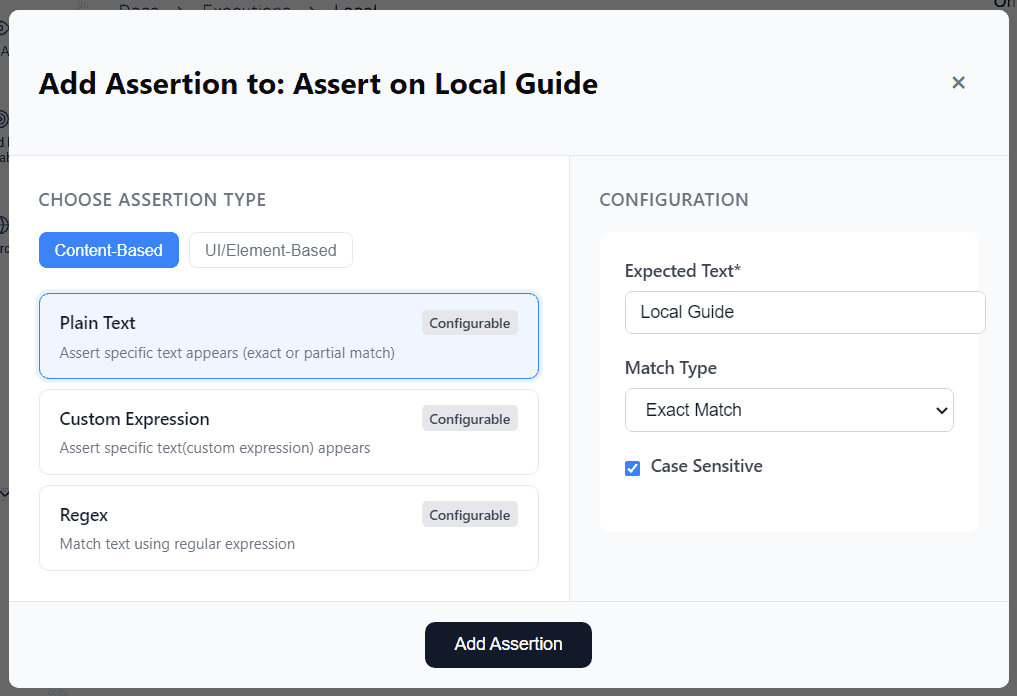
Content-Based Validation Types
Content-based assertions scan the physical characters displayed within a targeted DOM element. Robonito provides three sophisticated text validation engines depending on your complexity needs:
1. Plain Text
Asserts that a highly specific, static string of text appears on the page.
- Matching Support: Supports both Exact Match (every character must be identical) or Partial Match (the string just exists somewhere inside the target element).
- Use Case: Validating permanently static content such as primary headers, navigation button labels, and universal confirmation messages (e.g.,
"Payment Successful").
2. Custom Expression
Asserts text matching against a dynamic custom expression variable ({{!runtimeVariable}}).
- Behavior: Resolves a dynamic variable stored previously in memory and compares it against the live UI.
- Use Case: Validating dynamic, unpredictable runtime data. For example, ensuring that a generated User ID (
"User-8821") or a live timestamp is correctly rendered on the profile screen.
(Learn more about Custom Expression Assertions)
3. Regex (Regular Expressions)
Validates UI text by evaluating the element's inner text against a complex Regular Expression (RegEx) pattern.
- Behavior: Passes if the UI text mathematically satisfies the RegEx rules.
- Use Case: Matching structurally predictable but character-random formatting strings. Examples include validating that an input label is a properly formatted email address, a valid 5-digit zip code (
^\d{5}$), or a complex alphanumeric transaction hash.