Smart Assertions
Smart Assertions represent a breakthrough in test automation logic. Instead of wrestling with brittle CSS selectors or complex XPath configurations, Smart Assertions allow you to define UI validations using simple, human-readable English.
You just describe what should be true about a selected UI element, and Robonito’s AI engine automatically translates your intent into robust validation logic under the hood.
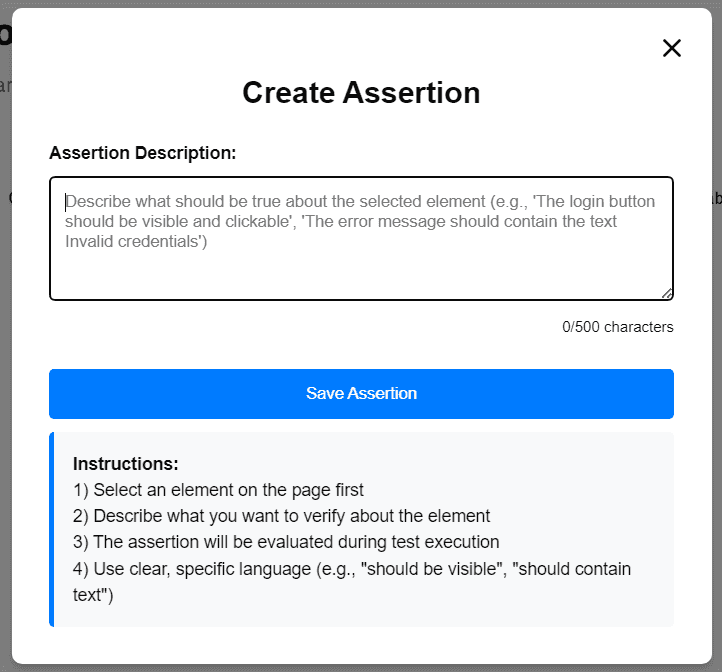
How to Create a Smart Assertion
You can inject a Smart Assertion during an active recording session or while editing a saved test step.
Writing the Assertion Description
Provide a clear, declarative sentence explaining exactly what you expect from the selected UI element.
Examples of Good Smart Assertions:
- "The login button should be visible and clickable."
- "The error message should contain the text 'Invalid credentials'."
- "The submit button should currently be disabled."
Note: The description box supports up to 500 characters, allowing for highly specific multi-condition sentences.
Best Practices for AI Validation
To ensure your Smart Assertions evaluate perfectly every time, follow these guidelines:
- Target Accuracy: Always click to accurately highlight the specific target UI element on the page before writing the rule.
- Be Explicit: Describe exactly what you want to verify. Avoid vague language like "It should work."
- Use Common Keywords: Robonito's engine responds exceptionally well to standard state keywords, including:
should be visibleshould be clickableshould contain textshould be disabledorenabled
- Save and Execute: Click Save Assertion.
Robonito will evaluate this plain-English rule dynamically during test execution.
Why Use Smart Assertions?
Relying on Smart Assertions dramatically streamlines your automation workflow:
- Zero Coding Required: Skip manual configuration and complex property dropdowns entirely.
- Maximum Readability: Anyone on your team—from developers to business analysts—can read the test and immediately understand its intent.
- Resilient Automation: Natural language assertions are far more resilient to minor frontend code changes (like changing a class name from
.btn-blueto.btn-primary) because the AI interprets the behavior rather than just the code.