Test Case Execution
Robonito allows you to execute your automated test cases using isolated execution environments. The Execution Configuration dialog enables you to explicitly define where a test case should run and which browser it should use before starting the automation engine.
This dialog appears automatically when you click the Execute button on any test case.
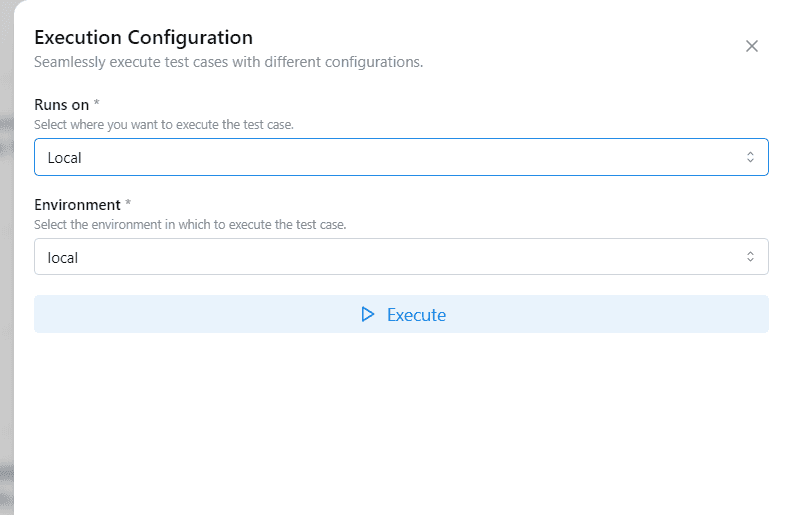
The Execution Configuration
The Execution Configuration panel provides options to control your test execution footprint:
1. Runs On
Select the underlying infrastructure where you want to execute your test case.
- Local Execution: Executes the test case on your current workstation using your natively installed Robonito application.
- Best used for: Active test development, initial debugging, and script validation.
- Cloud Execution (Premium): Executes the test case entirely on Robonito-managed servers.
- Best used for: CI/CD scheduled runs, enterprise scalability, and freeing up your local system resources.
2. Environment Variables
Select the target software metadata you want the test case to execute under.
- Currently defaults to your Local profile to use your local browser storage and cache environments seamlessly.
Cloud Access
Cloud execution is available as a scalable premium feature.
If your Robonito workspace does not have an active premium plan:
- The Execute button for cloud runs will dynamically disable itself.
- A visual prompt will guide you on how to upgrade your workspace.
To request premium cloud capabilities for your team, please reach out to Robonito Support via email or our community Slack channel.
Executing a Test Case
To start your automation run:
- Double-check your selected Runs On infrastructure and Environment dropdowns.
- Click the primary Execute button to initiate the run.
Once the automated execution starts:
- The test case begins executing sequentially exactly as you recorded it.
- Your execution progress is tracked and displayed in real-time.
- Visual logs and data results are generated immediately upon completion.