Page Assertions
Page Assertions are critical validations used to verify entire page-level metadata properties during test execution. Rather than checking a specific button or text block, these assertions ensure your application routes correctly and loads the appropriate core page context.
The Add Page Assertion dialog allows you to quickly inject routing validations during an active recording or while editing a saved test step.
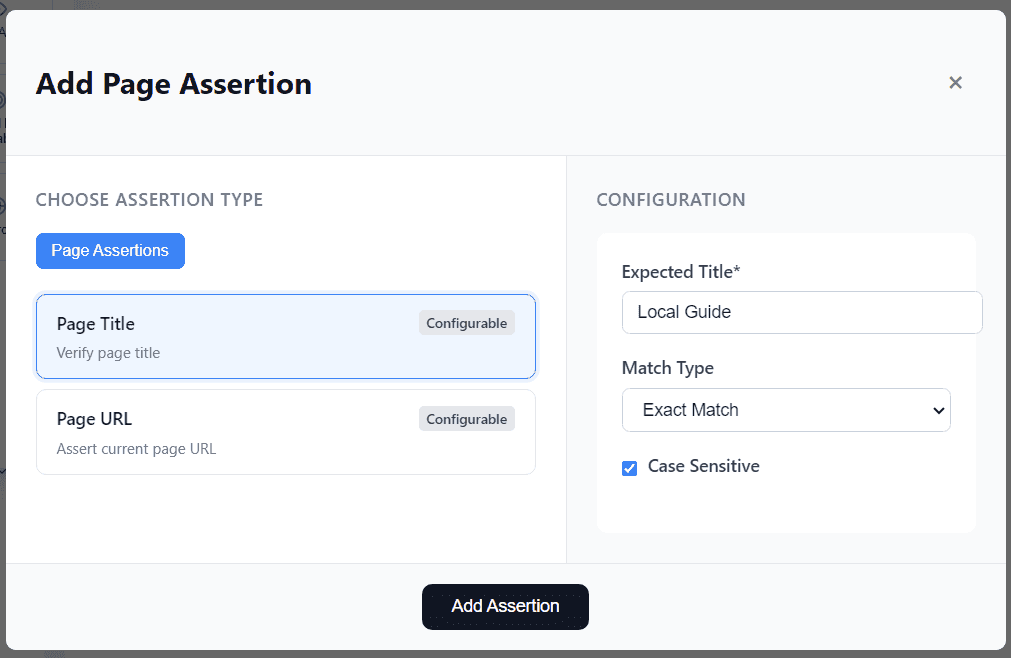
Supported Page Assertion Types
Robonito supports two foundational page-level routing assertions:
1. Page Title
Verifies the explicit text rendered inside the browser tab’s <title> tag for the currently active page.
Configuration Options:
- Expected Title: Enter the exact or partial string you expect the browser tab to display.
- Match Type:
- Exact Match: The
<title>must identically match the input string. - Partial Match: The
<title>only needs to prominently feature the input string.
- Exact Match: The
- Case Sensitive: Enable to strictly enforce capitalization.
Use Case:
Ensuring a user is successfully deposited on the correct page after a vital action (e.g., verifying the page title switches to "User Dashboard" immediately following a successful login attempt).
2. Page URL
Validates the explicit web address (HTTP URL) that the browser is currently resting on.
Configuration Options:
- Expected URL: Enter the full expected URL string (e.g.,
https://example.com/checkout/success).
Use Case:
Confirming secure navigation boundaries and exact routing logic (e.g., mathematically verifying the URL transitions from /cart to /checkout when clicking 'Proceed').
Adding a Page Assertion
To enforce a page assertion within your workflow:
- Select either the Page Title or Page URL option from the assertion menu.
- Provide your expected configuration string.
- Click Add Assertion to bind it to the timeline.
During execution, Robonito will freeze the DOM at that precise millisecond, evaluate the browser's overarching metadata, and log a permanent Passed or Failed status.